FAQ
Common questions, honest answers
Who built this?
I don't want my phone on the golf course.
I'd been using ChatGPT to create course guides and practice checklists based on my handicap and playing style. Great content—but it lived on my phone. I wanted something I could print, fold, stick in my back pocket, and not care if I lost it or got it wet.
I'm a project manager who thinks like a developer. I systemise everything—work processes, home routines, even my golf game. I use checklists for monthly reports, grocery runs ("have I forgotten the chicken spice?"), and an exit-home checklist for my everyday carry.
I used to be a trainer. I would have loved quick trifold handouts for key concepts and commands. Training manuals sit on the shelf—a single-page handout actually gets used.
ChatGPT, Claude, and other AI assistants are a force multiplier for creating content. But they're not great at taking it on the road. That's why I built TriFold PDF.
What's it good for?
Text-heavy content that you want to print and fold:
- Developer cheat sheets—Git commands, Vim motions, Docker CLI, and kubectl
- Quick reference cards—Keyboard shortcuts, API endpoints, and language syntax
- Pocket guides—Golf course yardages, walking tours, and event schedules
- Instructions—SOPs (standard operating procedures), safety checklists, and setup guides
If it's text-heavy and fits in Markdown, it works.
What's it not good for?
Some things don't work well:
- Image-heavy designs—Photos, graphics, and logos. For those, Canva's a better fit.
- Complex layouts—Multi-column tables, text wrapping around images. This is 3 columns, top-to-bottom.
- Long documents—The free version is one page only. multi-page is on the roadmap for Pro.
- WYSIWYG editing—You write Markdown, I handle the layout. No drag-and-drop.
Printers are weird too. You might need to adjust margins in your print settings.
Why the watermark?
The free version adds a small "Generated with trifoldpdf.com" watermark. It helps cover hosting costs and spreads the word.
If you need clean output—for clients, professional printing, or just personal preference—Pro removes it. One payment, no subscription.
How many devices can I use Pro on?
Up to 5 devices at a time. Use the restore page to activate Pro on each device—laptop, tablet, phone, work computer, whatever you need.
If you hit the limit, the oldest device is automatically deactivated when you add a new one. Your purchase never expires.
Can I use US Letter paper?
Yes. A4 and US Letter both work. Pick the one your printer uses.
- A4 (297mm × 210mm)—Standard outside the US
- US Letter (11" × 8.5")—Standard in the US
The fold marks adjust automatically. Print landscape, fold on the marks, done.
Is my content private?
Yes. TriFold PDF doesn't store your Markdown content.
When you generate a PDF, your content is sent to the server, converted in memory, and returned to your browser. No database. No logs of your content. Temporary files are deleted immediately.
For the full details, see the privacy page.
How do I control column breaks?
Use <!-- columnbreak --> in your Markdown to force a column break.
Without it, content flows naturally across all 3 columns. With it, you control exactly where each column starts.
Where does the Markdown come from?
Anywhere you like. Write it yourself, paste from your notes app, or generate it with ChatGPT, Claude, or any AI assistant—they all output Markdown by default.
See the prompts page for ready-to-use examples.
Do tables work?
No. Markdown tables aren't supported in trifold layouts—it's a technical limitation of how multi-column PDFs are generated.
The workaround is simple: convert tables to bullet lists with bold labels:
- **Name:** Alice
- **Role:** Developer
- **Location:** Sydney
This actually works better for pocket cards anyway—tables need horizontal space that trifolds don't have.
How do I fold it?
TriFold PDFs use a Z-fold (accordion fold) pattern. Here's how:
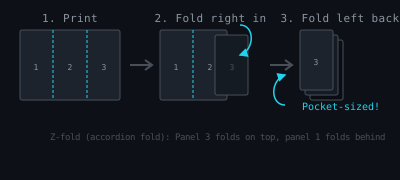
- Print at 100% scale—Select "Actual size" in your print settings. Landscape orientation.
- Fold the right panel inward—Bring the right edge to the first fold mark (dashed line).
- Fold the left panel backward—Fold the left edge behind, accordion-style.
- Use a straight edge—A ruler or credit card gives crisp folds.
The result is a pocket-sized card with panel 3 on top. Unfold to reveal all content.
What's coming next?
I'm working on:
- multi-page support—for longer content (Pro)
- custom fonts—beyond the default (Pro)
- more paper sizes—A5, half-letter
- template gallery—Starting points for common use cases
The free version will stay free. Pro adds extras for people who need them.